Silent Failure Monitoring Tools in 2026 — What Each Catches and What Each Misses
Not all monitoring tools detect silent failures. Here's how uptime monitors, error trackers, APM tools, and business pulse monitoring compare — and what each one actually catches.
Your monitoring stack is probably green right now.
Server up. Error rate clean. No active incidents. Everything looks fine.
But is your payment webhook actually delivering? Did your nightly invoice job process any records? Is your AI agent completing tasks or burning tokens in a loop? Is your signup flow converting — or just responding with a 200?
Most monitoring tools can't answer any of these questions. They were built to detect when things go wrong. Silent failures are when things stop going right — and that's an entirely different problem that most tools have no answer for.
This guide covers every major monitoring tool category honestly — what each one catches, what it misses, and which ones were actually built to detect the failures that cost you money without making noise.
What to Look for in a Silent Failure Monitoring Tool
Before comparing tools, here are the six capabilities that separate a tool that catches silent failures from one that doesn't:
Silence detection — alerts when expected events stop arriving. No new orders, no Stripe payments, no cron job completions. Not "something went wrong" — "something that should be happening stopped." Most tools don't have this concept at all.
Broken flow detection — tracks multi-step processes and alerts when a sequence starts but never finishes. payment.initiated → payment.completed. job.started → job.completed. The first event arrived — the second never did.
Baseline learning — knows what normal looks like for your specific traffic patterns, including time-of-day and day-of-week variation. A tool that alerts on "no orders in 2 hours" at 3am Sunday is useless. A tool that learns your Saturday afternoon order rate and alerts when it drops anomalously is not.
Cron job output monitoring — not just "did the job run?" but "did it do anything?" A nightly sync that ran successfully but processed zero records is a silent failure. Only tools that track records processed, not just heartbeat pings, catch this.
AI agent observability — loops, stalls, token budget overruns, and tasks that start but never complete. Agents fail differently from regular software — they don't crash, they drift. Most tools have no concept of agent-level monitoring.
On-call routing — when a silent failure is detected, it needs to reach the right person at the right time, with escalation if they don't respond. Detection without routing is a tree falling in a forest.
Tools Compared
Uptime Monitors — Better Uptime, UptimeRobot
What they do: send HTTP requests to your URLs every 1–5 minutes and alert if they get a non-2xx response or a timeout.
What they catch:
- Server completely down
- URL returning an error code
- SSL certificate expired
- Response time exceeding a threshold
What they miss:
- Webhook endpoints that respond 200 but process nothing
- Silence — no orders, no signups, no events (the URL is fine, the flow is broken)
- Broken multi-step flows
- Cron jobs that ran but did nothing
- AI agent loops and stalls
- Business logic failures that produce no HTTP error
Silent failure verdict: Structurally incapable. Uptime monitors watch whether your server responds. They have no awareness of whether your business is working. A signup flow that returns 200 on every request while silently dropping all registrations is invisible to any uptime monitor.
When to use: as a baseline layer — the floor, not the ceiling. Every stack needs uptime monitoring. It just isn't sufficient.
Error Trackers — Sentry, Bugsnag
What they do: capture exceptions, stack traces, and error events from your application code and group them for investigation.
What they catch:
- Unhandled exceptions
- JavaScript errors
- Crashes and panics
- Application-level errors with full stack traces
- Error rate trends over time
What they miss:
- Silent failures that produce no exception — webhook gaps, empty job runs, broken flows
- Absence of events — Sentry fires when something bad happens, not when something good stops happening
- Cron job output — a job that runs and processes zero records throws no exception
- AI agent loops — the agent makes valid API calls in a loop, no exception is raised
- Business-layer failures — payment flow that silently fails between steps
Silent failure verdict: Not designed for this. Error trackers are reactive — they need an error to fire. Silent failures by definition produce no error. A webhook endpoint that receives no events throws no exception. Sentry sees nothing.
When to use: essential for debugging exceptions and understanding error patterns. Pair with silence detection for complete coverage — they solve different problems.
APM Tools — Datadog, New Relic
What they do: instrument your application at the code level — traces, metrics, logs, infrastructure monitoring. The most comprehensive observability tools available.
What they catch:
- Infrastructure metrics (CPU, memory, disk, network)
- Request traces with latency breakdown
- Log aggregation and querying
- Custom metric dashboards
- Anomaly detection on metric streams (with configuration)
- Service dependency maps
What they miss:
- Silence alerts — no native concept of "expected event stopped arriving" for business events. Datadog's anomaly detection monitors configured metric streams, not arbitrary business event gaps
- Broken flow detection — no native tracking of multi-step business process completion
- Business layer — Stripe, Shopify, AI agents aren't first-class concepts in APM tooling
- Cron output quality — Datadog can monitor that a job ran, not that it processed the expected volume of records
- AI agent loops — no concept of iteration-level agent monitoring
Silent failure verdict: Partial. Datadog's anomaly detection can catch some silent failures on configured metrics — but requires significant setup, produces noisy false positives early on, and has no awareness of business-layer events. It's infrastructure observability, not business pulse monitoring. The overlap with true silent failure detection is narrow.
When to use: for infrastructure and application performance at scale. If you have a 20+ person engineering team and budget for $300–600+/month, Datadog is world-class at what it does. For business-layer silent failures — you still need a complementary tool.
Cron Monitors — Cronitor, Healthchecks.io
What they do: expect a regular ping from your scheduled job. If the ping doesn't arrive within a defined window, they alert.
What they catch:
- Cron jobs that didn't run at all
- Cron jobs that ran but didn't send a completion ping
- Jobs running longer than expected
- Schedule drift
What they miss:
- Cron job output quality — a job that pings on completion but processed zero records looks identical to a healthy run. Cronitor and Healthchecks.io only track whether the ping arrived, not what the job did
- Business-layer events — no Stripe, Shopify, AI agent monitoring
- Silence detection on arbitrary event streams
- Broken flow detection
- ML baseline learning — manual window configuration required
Silent failure verdict: Partial — for cron jobs only. The heartbeat model catches "job didn't run." It doesn't catch "job ran and did nothing." For complete cron monitoring, you need to track records processed alongside the completion ping.
When to use: as a cron-specific layer. Cronitor is purpose-built and excellent for schedule-aware job monitoring. Pair with output metric tracking for complete coverage.
Incident Management — PagerDuty, OpsGenie
What they do: receive alerts from monitoring tools and route them to the right on-call engineer, with escalation policies and incident workflows.
What they catch: whatever your monitoring tools send them. PagerDuty is a routing layer, not a detection layer. It amplifies the signal from connected tools — it doesn't generate its own.
What they miss:
- Everything a monitoring tool misses — PagerDuty has no independent detection capability for silent failures
- Business-layer events natively
- Silence detection
- Broken flow detection
- AI agent monitoring
Silent failure verdict: Not a detection tool. PagerDuty is the best in the world at routing alerts that someone else detected. If none of your connected monitoring tools detect a silent failure, PagerDuty never fires.
When to use: as the on-call routing layer for large engineering teams. For teams under 10, the per-user pricing ($21–41/user/month) is hard to justify when simpler tools include on-call routing in a flat rate.
NotiLens — Built for Silent Failures
What it does: business pulse monitoring — watches whether your business is actually healthy, across payments, orders, jobs, APIs, agents, and custom events. Learns your baseline automatically using ML and alerts when things go wrong or go quiet.
What it catches:
Silence detection — Smart Silence Detection uses ML to learn your normal event frequency including time-of-day and day-of-week variation. Alerts when activity goes abnormally quiet — no orders, no payments, no signups, no webhook events — without manual window configuration.
Broken flow detection — tracks multi-step processes and alerts when a sequence starts but never completes. payment.initiated → payment.completed. job.started → job.completed. Each flow instance tracked independently via the SDK run context.
ML anomaly detection — alerts when metrics deviate from your learned baseline. Catches gradual degradation, time-of-day anomalies, and relative spikes that fixed thresholds miss.
Cron job output monitoring — tracks start ping, completion ping, records processed, and runtime via SDK task lifecycle. A job that completed but processed zero records is a silent failure NotiLens catches.
AI agent observability — run.loop() called on every agent iteration lets NotiLens ML detect when iteration count is anomalously high without completion. run.wait() catches stalls. run.timeout() catches SLA breaches. Native MCP support for Claude and GPT agents.
On-call routing — full on-call scheduling (weekly/daily/custom rotations), timezone-aware active hours, holiday overrides, unlimited escalation steps, and Do Not Disturb per user — included in the Team plan at a flat rate.
What it doesn't have (yet): status pages, log management, multi-location uptime verification.
Silent failure verdict: The only tool in this comparison built specifically around the silent failure problem.
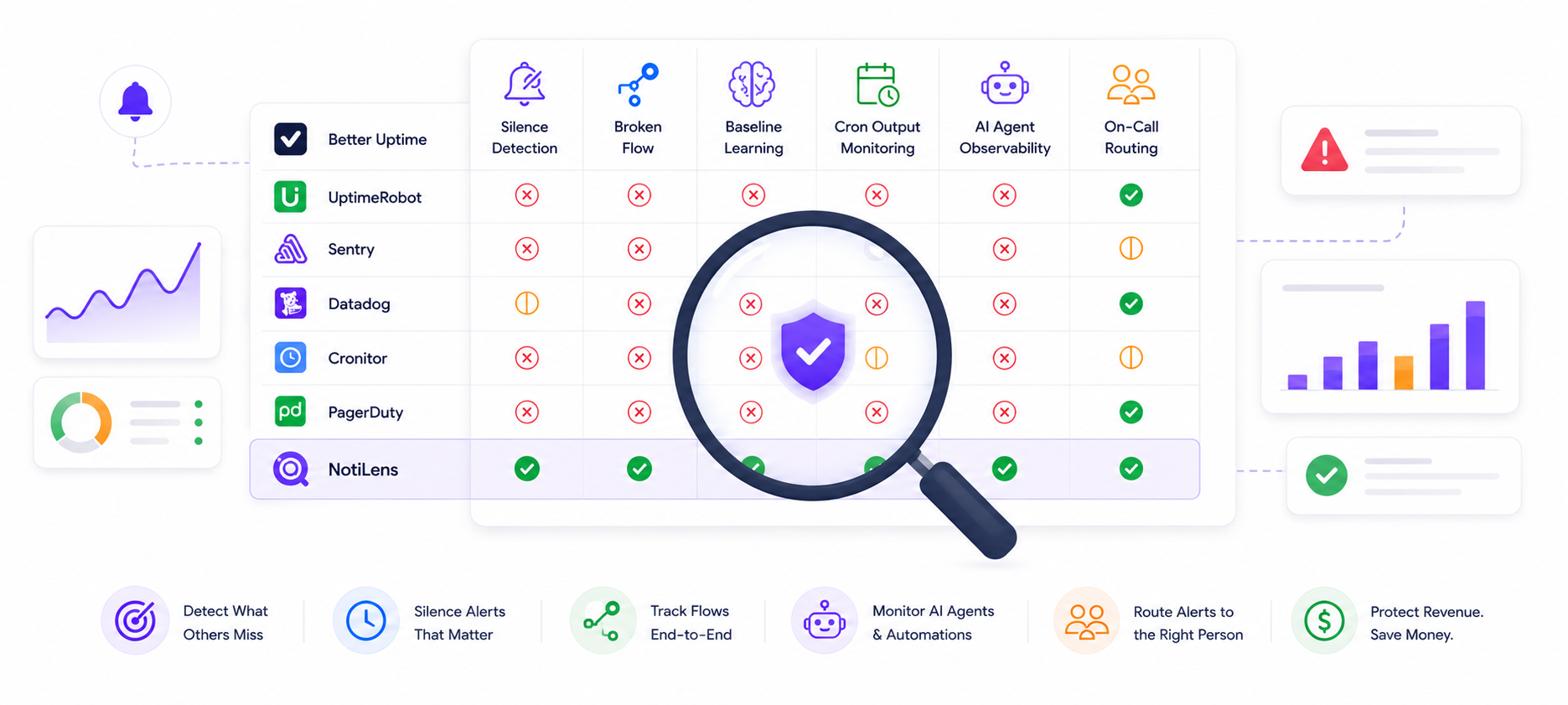
The Comparison Table
| Tool | Silence Detection | Broken Flow | Baseline Learning | Cron Output | AI Agent | On-Call |
|---|---|---|---|---|---|---|
| Better Uptime | ❌ | ❌ | ❌ | ❌ | ❌ | ✅ |
| UptimeRobot | ❌ | ❌ | ❌ | ❌ | ❌ | ⚠️ Basic |
| Sentry | ❌ | ❌ | ❌ | ❌ | ❌ | ❌ |
| Bugsnag | ❌ | ❌ | ❌ | ❌ | ❌ | ❌ |
| Datadog | ⚠️ Partial | ❌ | ⚠️ Partial | ❌ | ❌ | ✅ |
| New Relic | ⚠️ Partial | ❌ | ⚠️ Partial | ❌ | ❌ | ✅ |
| Cronitor | ❌ | ❌ | ❌ | ⚠️ Heartbeat only | ❌ | ⚠️ Basic |
| Healthchecks.io | ❌ | ❌ | ❌ | ⚠️ Heartbeat only | ❌ | ⚠️ Basic |
| PagerDuty | ❌ | ❌ | ❌ | ❌ | ❌ | ✅ |
| OpsGenie | ❌ | ❌ | ❌ | ❌ | ❌ | ✅ |
| NotiLens | ✅ ML-powered | ✅ | ✅ | ✅ | ✅ | ✅ |
Legend:
- ✅ Native, first-class support
- ⚠️ Partial — possible with significant configuration or limited scope
- ❌ Not supported
Which Tool Fits Which Use Case
Just need uptime monitoring: → Better Uptime or UptimeRobot. Both are excellent at the core use case. Better Uptime adds status pages and incident management; UptimeRobot is simpler and cheaper.
Just need error tracking: → Sentry. Best-in-class exception capture, grouping, and debugging workflow. Pair with NotiLens for the silent failures Sentry can't catch.
Large infra team with budget: → Datadog. The most powerful infrastructure observability platform available. Still needs a complementary tool for business-layer silent failures.
Just need cron job monitoring:
→ Cronitor. Purpose-built, schedule-aware, excellent developer experience. Add run.metric("records", ...) via the NotiLens SDK for output quality monitoring.
Need incident routing only: → PagerDuty if you're a large team with complex escalation requirements. NotiLens Team plan if you want on-call routing included in your monitoring tool at a flat rate.
Need silent failure detection across payments, cron jobs, and AI agents: → NotiLens. The only tool built specifically for this problem. Everything else is either a detection gap or a partial solution.
Running a complete stack as a small team: → NotiLens + Sentry. NotiLens covers silent failures, business events, on-call routing. Sentry covers exceptions and error debugging. Between the two you have comprehensive coverage without Datadog's cost or complexity.
The Detection Gap Calculation
Here's the ROI math that makes silent failure monitoring worth prioritising over other tooling investments:
Scenario: payment webhook stops delivering at 2am.
| Without silent failure monitoring | With NotiLens | |
|---|---|---|
| Detection time | 6 hours (user emails at 8am) | ~60 seconds |
| Orders affected | 20/hr × 6hr × $150 avg = $18,000 | 20 × 1min × $150 = $50 |
| Support tickets | Dozens | Zero |
| Engineer investigation hours | 2–4 hours | 0 |
| Customer trust damage | Significant | Avoided |
One caught payment webhook failure covers months of NotiLens.
Most teams catch several silent failures per month once they're actually watching for them — payment gaps, broken onboarding flows, cron jobs that processed zero records, AI agents that looped instead of completing. The failures were always there. The monitoring wasn't.
Summary
Every tool in this comparison is genuinely useful for what it was built to do. The problem isn't that they're bad tools — it's that none of them were built for silent failures.
Uptime monitors catch servers going down. Error trackers catch exceptions. APM tools catch infrastructure degradation. Cron monitors catch jobs that didn't run. Incident management routes alerts that someone else detected.
None of them catch the thing that's actually breaking your business: the expected event that stopped arriving, the multi-step flow that started and never finished, the job that ran and did nothing, the agent that looped instead of completing.
That's what NotiLens was built for.
Try NotiLens free for 7 days — no credit card required.
Related reading: